
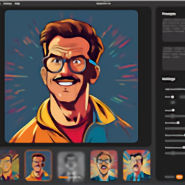
 With Vector FX 2.0, Corel is launching a standalone AI application that transforms text prompts or images into clean, fully editable SVG vectors – and does so entirely locally on your computer. No cloud, no credits, no subscription model. Instead, a perpetual license with no recurring costs. Unsurprisingly, Vector FX 2.0 is enjoying great popularity, and Corel has now introduced a new Version 2.0.
The crucial point: Version 2.0 is not just a minor update, but a structural expansion featuring new models, a redesigned interface, and significantly expanded real-time controls for vectors.
Below, you will find a well-founded classification – with a clear focus on the innovations.
What is Vector FX 2.0 in principle?
Vector FX 2.0 is an AI-powered desktop application for Windows 10/11 (64-bit) that converts text descriptions or image templates into scalable SVG graphics. The generated vectors are fully editable and can be directly integrated into design workflows – especially in combination with CorelDRAW Graphics Suite, but also with other tools that work with vector graphics.
The software is aimed at:
- Graphic designers
- CorelDRAW power users
- Print & sign shops (plotters, lasers, CNC)
- Illustrators
- Marketing teams
- Content producers
… and generally ambitious creatives, representing a fairly broad target group.
Unlike many web tools, the entire generation process runs locally on the CPU or GPU. This means full data control and no uploads of sensitive content, though your own hardware must meet certain requirements.
The Most Important New Features in Version 2.0
1. Model Hub Integration – 18 AI Models to Choose From
The biggest functional expansion is the new Model Hub. Version 2.0 provides access to 18 optimized model variants, including:
- Flux.1 Schnell
- Stable Diffusion 3.5 Medium
- Segmind Stable Diffusion 1B
- SDXL Turbo
What does this mean in practice?
You can select the model specifically based on hardware performance, speed, or style. For example, SDXL Turbo is optimized for fast generation, while other models provide higher depth of detail. This is a clear step forward compared to Version 1.x, as you are no longer tied to a single AI engine.
2. Completely Redesigned User Interface
The UI has been fundamentally modernized. The goal was higher clarity and faster navigation.
Improvements:
- More logical structure of control elements
- Better visibility of vector settings
- Clearly separated model, style, and control areas
- More efficient multi-document management
3. Real-Time Vector Controls
This is one of the most powerful innovations. Instead of regenerating every time, you can adjust the vector details immediately. Parameters such as:
- Level of detail
- Smoothing
- Corner definition
- Color simplification
- Shape simplification
- Path coarseness
- Node density
- Merging of areas
… are calculated in real time. This fundamentally distinguishes Vector FX 2.0 from classic bitmap-to-vector converters. Here, you actively control the structure instead of just vectorizing.
4. AI Style Presets
Newly added are predefined style presets, for example for:
- Icons
- Logos
- Clipart
- Patterns
- Vector illustrations
5. Smart Background Removal & Smart Crop
Further functional expansions include automatic background removal, intelligent cropping, and optimized subject focus.
6. Multi-Document Gallery
Multiple projects can be managed in parallel. This is particularly relevant for agencies or production environments.
7. Batch Generation
Version 2.0 allows for the serial generation of vectors. This is a clear production feature – for instance, for icon sets or pattern libraries.
Technical Requirements
Minimum (SDXL-Turbo):
- Windows 10/11 (64-bit)
- Intel Core 11th Gen or AMD Ryzen (≥ 2 GHz)
- 16 GB RAM
- Integrated or dedicated GPU (Intel Iris Xe or newer)
- 5 GB storage
Recommended for GPU acceleration:
- 32 GB RAM
- NVIDIA GeForce 10-series or higher with 12 GB VRAM or Intel Arc / Iris Xe (dedicated)
Important: The interface is exclusively in English.
Conclusion: Vector FX 2.0
Vector FX 2.0 is not a toy, but a tool clearly designed for production environments. For CorelDRAW users, print and sign shops, or designers who need clean SVG files, this is a powerful, locally operating AI tool with a clear focus on precision and control.
More information on the new Corel Vector FX 2.0 version can be found here at the provider’s site.




