AI image tools are becoming increasingly versatile. They can turn existing photographs into completely different visual styles, remove backgrounds, create illustrations or generate entirely new images from a simple text description.
Two products that take different approaches to this are Vision FX 3.0 and Render FX. Both are designed for local AI image processing on a Windows PC, but they are not simply two versions of the same application.
The most important difference is actually quite easy to remember:
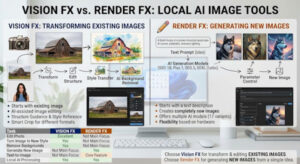
Vision FX is primarily designed to transform and edit existing images with AI. Render FX is primarily designed to generate new images from text prompts.
Vision FX or Render FX? The Quick Answer
If you simply want to know which application fits your particular task, this is the easiest way to decide:
- You already have a photo or image and want to transform it: Vision FX.
- You want to turn an existing image into a different artistic style: Vision FX.
- You want to remove a background with AI: Vision FX.
- You want AI to work with the structure of an existing image: Vision FX.
- You have an idea but no source image: Render FX.
- You want to create a completely new image from a text description: Render FX.
- You want to experiment with different image-generation models: Render FX.
- You regularly edit existing images and create new ones: Using both can make sense.
In other words:
Existing image = Vision FX.
New image idea = Render FX.
What Is Vision FX 3.0?
Vision FX 3.0 is focused on AI-assisted image editing and transformation. Instead of starting with a blank canvas, the workflow usually starts with an existing image.
This could be a photograph, illustration, product image or your own graphic design. AI can then be used to transform the image, change its visual appearance or create a different interpretation of the original.
This makes Vision FX fundamentally different from a pure text-to-image generator.
The basic idea is:
“I already have an image. What can AI turn it into?”
What Can Vision FX 3.0 Do?
The current version includes several AI-powered image editing and transformation features. These include AI image transformation and editing, background removal, Smart Crop, Structure Guidance and Style Reference.
The ability to describe changes using natural language is particularly useful. Instead of manually performing every editing step, you can use AI to move an existing image in a particular creative direction.
Structure Guidance
One challenge with AI image transformation is that the AI may change more than you intended. When an image is transformed into a different style, important elements of the original composition can sometimes change as well.
Structure Guidance is designed to provide more control over this process by using the structure of the source image as a guide.
This can be useful when, for example, you want to turn a photograph into an illustration while keeping the main subject and overall composition recognizable.
Style Reference
Style Reference takes a different approach. Instead of describing every aspect of the desired visual style in words, you can use a reference image to provide a visual direction.
This can be particularly useful when you know what you want the final result to look like but would find it difficult to describe the style precisely in a text prompt.
AI Background Removal
Vision FX is not limited to artistic image transformations.
Its AI-powered background removal can be useful for product photography, marketing graphics, social media content and other situations where a subject needs to be separated from its background.
For users who regularly work with their own photographs and graphics, this makes Vision FX considerably more versatile than a pure image generator.
Smart Crop
Smart Crop is another practical feature of Vision FX. It is designed to help adapt an image to a different format while keeping the important part of the image in focus.
This can be useful when the same photograph needs to be prepared for different layouts, websites or social media formats.
What Is Render FX?
Render FX takes a different approach. Its main focus is text-to-image generation.
You describe what you want to see using a text prompt, and the application generates a new image based on that description.
For example, you could enter a prompt such as:
“A black Husky standing in a snowy mountain landscape at sunset, dramatic lighting, realistic photography, cinematic atmosphere.”
No original photograph is required. The image is generated from the idea expressed in the prompt.
The basic principle is therefore:
“I know what I want to see. Create an image based on my description.”
Render FX Offers Multiple AI Models
One of the more interesting aspects of Render FX is its choice of AI models.
According to the manufacturer, Render FX provides four AI models in a total of 17 variants:
- SSD-1B
- Flux.1 Schnell
- Stable Diffusion 3.5 Medium
- SDXL-Turbo
Different models can have different strengths in terms of speed, image quality and hardware requirements.
This gives users more flexibility than a generator that is tied to a single model. Depending on the project and available hardware, you can select a model that better fits the task.
Prompts and Negative Prompts
Render FX uses the familiar prompt-based workflow found in modern AI image generators.
The prompt describes what should appear in the image. A negative prompt can be used to specify elements or characteristics that should be avoided.
You can also influence parameters such as image quality, scaling, noise and aspect ratio.
This gives experienced users additional control over the generation process, although AI-generated images will naturally remain less predictable than editing a specific existing photograph.
Vision FX vs. Render FX: The Main Differences
| Task | Vision FX 3.0 | Render FX |
|---|---|---|
| Edit an existing photograph | Excellent choice | Not the main focus |
| Transform an image into another style | Yes | Not the main focus |
| AI-assisted image editing | Yes | Not the main focus |
| Remove backgrounds | Yes | Not the main focus |
| Use source-image structure as guidance | Structure Guidance | Not the main focus |
| Use a reference image for style | Style Reference | Not the main focus |
| Generate a completely new image | Not the main focus | Yes |
| Text-to-image generation | Not the main focus | Core feature |
| Multiple AI generation models | Yes | 4 models / 17 variants |
| Create blog images and illustrations | Possible | Excellent choice |
| Work with existing product images | Excellent choice | Less suitable |
| Local AI processing | Yes | Yes |
A Practical Example: Transforming a Dog Photo vs. Creating a New Scene
Imagine you have taken a photograph of a dog and want to turn it into a fantasy illustration.
Vision FX is the natural choice. Your photograph provides the starting point, and AI transforms its visual appearance.
Now imagine that you simply have the idea of a black Husky standing in a snowy mountain landscape at sunset.
Render FX is more appropriate here. There is no need to find or take a suitable photograph first. The image can be generated from your description.
This is perhaps the clearest way to understand the difference:
Vision FX asks: “What can I make from this image?”
Render FX asks: “What image can I create from this idea?”
Can You Use Vision FX and Render FX Together?
Yes. In fact, using the two applications together can make sense for more advanced workflows.
You could use Render FX to create a completely new image or concept and then use Vision FX to transform or refine it.
The opposite workflow is also possible. You might start with one of your own photographs in Vision FX and use Render FX later to create additional images for the same project.
The two applications therefore do not necessarily need to be viewed as direct competitors. They can cover different stages of a local AI image workflow.
Local AI Is One of the Most Interesting Aspects
Both applications are designed for local processing on your own Windows PC.
This is worth mentioning because many popular AI image services process uploaded images on remote servers.
Local processing can be particularly attractive when working with personal photographs, unpublished product images, client projects or other material that you would rather not upload to a cloud service.
There is, however, a trade-off.
Your own computer has to provide the required processing power.
Hardware Matters
Local AI is fundamentally different from using a cloud-based image generator.
With a cloud service, the provider operates the GPUs and other infrastructure required to generate the image. With Vision FX and Render FX, the workload is handled locally.
Vision FX lists a minimum of 12 GB of RAM and a multicore Intel or AMD processor. More powerful hardware and additional memory are recommended for faster GPU-accelerated processing.
Render FX lists at least 16 GB of RAM and current Intel or AMD processors. Its recommended configuration also calls for 32 GB of RAM and a more powerful graphics solution.
The exact processing speed will depend on the selected AI model and the hardware available in the computer.
This means that a computer that is perfectly adequate for normal photo editing may still take considerably longer to generate AI images locally.
Who Should Choose Vision FX?
Vision FX makes the most sense if you already work with photographs, graphics or other source images.
- Photographers who want to transform their images
- Content creators working with their own photographs
- Online sellers working with product images
- Designers and graphic artists
- Users who want to experiment with different visual styles
- Users who frequently need to remove backgrounds
- Social media creators working with their own images
The key advantage is that AI does not have to start from nothing. Your original image remains the basis of the workflow.
Who Should Choose Render FX?
Render FX is particularly interesting if you frequently need completely new images based on ideas or written descriptions.
- Bloggers and content creators
- Designers and creative professionals
- Marketing users
- Social media creators
- Users creating concept art
- Users who need custom illustrations
- Anyone interested in running text-to-image AI locally
The main advantage is creative freedom. You do not need to take a photograph or find suitable stock material before you can start creating.
Which One Would I Choose?
If I had to choose only one, I would not make the decision based on the number of AI features. I would base it on the type of work I actually do.
I would choose Vision FX if existing images are at the center of my workflow.
I would choose Render FX if generating new images is the main goal.
For example, a blogger who mainly needs new header images and illustrations for articles may get more value from Render FX. A photographer or designer who wants to transform existing photographs may find Vision FX much more useful.
And if you regularly do both, there is no reason to think of the applications as mutually exclusive. The combination of local image generation and local AI image transformation can be quite powerful.
Final Verdict
Vision FX and Render FX may look like similar AI image tools, but they serve different purposes.
Vision FX 3.0 is the better choice for AI-assisted editing and transformation of existing images. Features such as Structure Guidance, Style Reference, Smart Crop and AI background removal make it particularly useful when you already have source material.
Render FX is the better choice for local text-to-image generation. Its focus is creating new images from prompts, while the availability of multiple AI models gives users additional flexibility.
The simplest way to remember the difference is:
You have an image → Vision FX.
You have an idea → Render FX.
You have both → Vision FX and Render FX can complement each other.
For me, the local-processing approach is one of the most interesting aspects of both products. It can be valuable when working with personal or sensitive images and when you want more control over where your source material is processed.
At the same time, local AI requires appropriate hardware. If your computer has limited RAM or a relatively weak GPU, cloud-based AI services may still be considerably faster.
But if you want to experiment with AI image generation and transformation directly on your own Windows PC, Vision FX and Render FX offer two distinctly different approaches rather than simply competing versions of the same tool.
Since deals fluctuate, I omitted specific numbers. Just have a quick look.