Meta description: Vector FX vs. Vision FX: Learn the difference between vector and pixel-based AI graphics, local AI processing, prompting, and the new Vision FX 3 features.
Vector FX and Vision FX take a similar approach, but they operate in different worlds: Vector FX specializes in vector graphics, while Vision FX is designed for pixel-based images, image generation, and creative image editing. Both applications use AI, support text prompts, and run locally on your Windows PC.
This makes both programs an interesting alternative to many web-based AI services. Instead of creating images exclusively through a cloud service, AI processing takes place directly on your own computer. At the same time, both are standalone applications that can be used independently of a complete graphics suite.
Right now, Vector FX 2.0 with 50% off is particularly interesting. Vision FX 3, meanwhile, focuses on the new version 3 and features such as AI image editing, background removal, Smart Crop, Structure Guidance, and Style Reference.
Vector FX or Vision FX – What Is the Most Important Difference?
The most important difference is the output format and therefore the type of graphics each application works with: Vector FX creates editable vector graphics, while Vision FX works with pixel-based images.
In simple terms, vector graphics consist of mathematically defined lines, curves, and shapes. They can be enlarged virtually without limit without the edges becoming pixelated. This makes them useful for logos, icons, lettering, stickers, plotter files, and print graphics, for example.
Pixel-based images, on the other hand, consist of individual pixels. Photos, digital paintings, photorealistic AI images, and many illustrations belong to this category. This is exactly where Vision FX focuses.
| Feature | Vector FX | Vision FX 3 |
|---|---|---|
| Graphics type | Vector | Pixel / Raster |
| AI generation via prompt | Yes | Yes |
| Existing images as a starting point | Yes | Yes |
| Local processing | Yes | Yes |
| Main focus | Logos, icons, illustrations, vector design | Photos, illustrations, image transformation, and image editing |
| Further editing | Vector objects and SVG | Pixel images and AI-based image editing |
| One-time purchase | Yes | Yes |
What Do Vector FX and Vision FX Have in Common?
Both applications combine generative AI with a local desktop application. This means you can use traditional tools while also describing in natural language what you want to create or change.
A prompt can describe a specific image idea, a particular style, or a desired modification. The AI then performs the actual generation or transformation.
Another common feature is local processing. According to Corel, Vector FX processes generation directly on the user’s device and does not require cloud uploads or a credit system. The license is also designed for permanent use without an ongoing subscription.
This distinguishes the applications from the typical model used by many online AI services. With those services, images are often processed on the provider’s servers, while usage is controlled through subscriptions, credits, or generation limits.
Vector FX 2.0: Create AI-Generated Vector Graphics Directly on Your PC
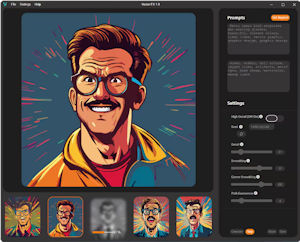
Vector FX 2.0 is the more interesting choice if you want to work with editable vector graphics. The application can create vector graphics from text prompts or existing images. The results can then be exported as SVG and further edited in vector software such as CorelDRAW.
This is a significant difference compared with traditional AI image generators. A conventional AI-generated image can look excellent, but it cannot easily be edited like a classic vector graphic.
Vector FX, by contrast, is designed to produce an actually reusable vector graphic. This makes the application particularly interesting for logos, icons, illustrations, branding elements, stickers, lettering, and other graphic production workflows.
What Can Vector FX 2.0 Do?
Vector FX 2.0 combines AI generation with tools for controlling and refining the resulting vector graphics. According to Corel, 18 optimized AI model variants are available, including Flux.1 Schnell, Stable Diffusion 3.5 Medium, Segmind Stable Diffusion 1B, and SDXL Turbo.
There are also various style presets. These allow you to define the desired visual direction without having to describe every aspect in a long prompt.
Another interesting feature is the real-time control over the generated vectors. This includes settings for detail density, smoothing, node distribution, shape merging, color regions, and path complexity.
The result can then be exported as an SVG file. This means you can open the generated graphic in CorelDRAW or another vector graphics application and continue editing it there.
Vector FX with 50% Off: The Current Offer
Vector FX 2.0 is currently available with 50% off. This makes it worth taking a closer look at the software, especially if you have been looking for a local AI solution for vector graphics.
The offer is also interesting because Vector FX does not rely on a traditional monthly credit model. Corel describes Vector FX 2.0 as a standalone application with unlimited local generation and a perpetual license.
For users who regularly create logos, icons, illustrations, or other vector graphics, this type of licensing model can be more attractive than a service where every additional generation depends on the amount of available AI credits.
→ Check out Vector FX 2.0 and take advantage of the current 50% discount
Who Is Vector FX Particularly Useful For?
Vector FX is primarily aimed at graphic designers, illustrators, marketing and content creators, as well as users working in printing, signage, and lettering.
For applications such as vinyl cutting, laser engraving, CNC machining, or plotting, a clean vector format is essential. Corel explicitly identifies these areas as typical use cases for Vector FX.
The application can also be interesting for small businesses and freelancers. A logo or simple illustration can initially be created using a prompt and then customized individually.
Vision FX 3: AI for Pixel Images, Photos, and Creative Image Transformation
Vision FX 3 takes a different approach. The focus here is on pixel-based images, photos, illustrations, and creative image transformations.
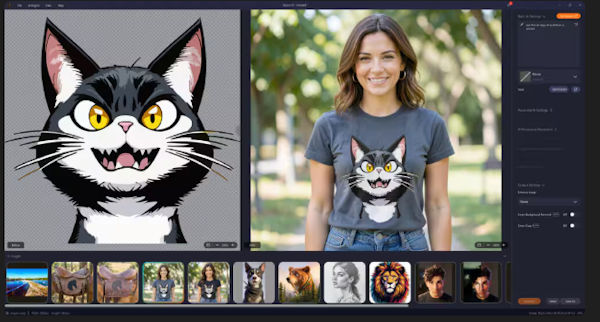
You can use an existing image as a starting point and then describe through a text prompt what you want to change. You can also create new image ideas and experiment with different visual variations.
This makes Vision FX particularly suitable for tasks such as photo manipulation, artistic transformations, social media graphics, product images, concept art, or creative image variations.
What Is New in Vision FX 3?
Vision FX 3 expands the concept significantly toward generative image editing. In addition to image generation itself, the focus is on editing existing images and providing greater control over transformations.
One important new feature is AI-powered image transformation. Photos, illustrations, renderings, or concept sketches can be developed in a different visual direction using natural language instructions.
For example, you can specify a particular drawing style, artistically modify a subject, or have an entire scene reinterpreted.
AI Image Editing with Prompts
Vision FX 3 is not just a generator for creating new images. Existing images can also be modified using text instructions.
You can change colors and styles, remove people or elements from an image, or redesign specific parts of a composition. This creates a workflow that is closer to intelligent image editing than to a conventional AI image generator.
Intelligent Background Removal
Another important feature is automatic background removal. The AI can identify the main subject and remove the background.
This can be useful for product images, online stores, presentations, social media graphics, or marketing materials. Particularly when dealing with hair, clothing, or other fine details, automatic AI selection can eliminate a considerable amount of manual work.
Smart Crop
Smart Crop helps prepare the relevant area of an image for further editing. The AI identifies the important subject or relevant area and can adjust the crop accordingly.
Structure Guidance
Structure Guidance provides greater control over which structural characteristics of the source image should be preserved.
This is particularly useful when you want to creatively transform an existing subject without completely abandoning its original composition.
Style Reference
Style Reference takes a similar approach on the creative side. Instead of describing the desired style exclusively in words, you can use a reference image as a visual guide.
This makes it possible to define the desired artistic direction more precisely. It can be particularly helpful when experimenting with different visual styles.
More Variations and Batch Processing
Vision FX 3 also supports the creation of multiple variations and batch processing. This allows you to generate and compare different results and then continue editing the most interesting version.
This is practical for creative workflows: instead of spending a long time refining a single result, you can first generate several ideas and then selectively refine them.
Vision FX 3 and Vector FX: Two Different AI Tools
The two applications are therefore not necessarily direct competitors. In many workflows, they can actually complement each other.
Imagine that you want to develop an advertising campaign. With Vision FX, you could first create a photorealistic subject, a creative visual concept, or different product presentations. If you then need a logo, icon, or scalable graphic element, Vector FX could be the appropriate solution.
Conversely, a vector graphic created with Vector FX could become part of a larger design that is then combined with pixel-based images and image editing.
The key point is therefore simple: Vector FX is for vectors, Vision FX is for pixels.
Local AI: Why Can It Be an Advantage?
Both applications are designed to perform AI processing locally on your own PC. This is particularly interesting for users who do not want to transfer their images and data to a cloud service for every generation.
At the same time, local AI means that your hardware plays a more important role. Depending on the model and task being used, the processor, RAM, and especially the GPU can have a significant impact on processing speed.
For Vector FX, for example, Corel lists 16 GB of RAM as a minimum requirement and recommends 32 GB of RAM and a more powerful GPU for faster GPU-accelerated processing. Intel, AMD, and NVIDIA hardware are supported.
The principle is therefore straightforward: cloud AI moves the computing workload to the provider’s servers, while local AI uses the resources of your own computer.
Prompt-Based AI: Both Applications Understand Natural Language
One of the biggest similarities between Vector FX and Vision FX is their use of prompts.
Instead of manually drawing or editing every aspect of a graphic, you can first describe what you want to achieve. The AI interprets the instruction and creates a graphic or image variation from it.
This also makes the applications interesting for users who are not professional graphic designers. At the same time, traditional post-processing remains possible. The AI therefore does not necessarily create the final product, but can serve as a starting point for the creative process.
Vector FX or Vision FX – Which Program Is Right for You?
If you want to create logos, icons, vector graphics, illustrations, or files for printing, plotters, and signage, Vector FX is the more suitable choice.
If you want to create and edit photos, pixel-based images, creative variations, or artistic transformations, Vision FX is the more interesting option.
The difference can therefore be summarized quite easily: Vector FX creates editable vectors, while Vision FX works with pixel-based images.
Both applications share local AI processing, prompt-based generation and editing, and the idea of using AI as a creative tool directly on your own PC.
Vector FX 2.0 or Vision FX 3: My Conclusion
Vector FX and Vision FX are less direct competitors than two specialized AI tools for different types of graphics.
Vector FX 2.0 is interesting when you need the result as a scalable and editable vector graphic. The combination of prompt-based generation, different AI models, style presets, vector controls, and SVG export makes the application particularly useful for professional graphic design and production workflows.
The current 50% discount makes Vector FX 2.0 especially interesting for anyone looking to try or permanently use a local AI solution for vector graphics.
Vision FX 3, on the other hand, focuses on pixel-based images. The new generation combines AI image generation with image transformation and practical editing features such as background removal, Smart Crop, Structure Guidance, and Style Reference. This makes Vision FX particularly suitable for photos, illustrations, content creation, and creative image editing.
If you regularly work with both types of graphics, there is therefore a good case for using both applications. Vector FX is the AI toolbox for vectors, while Vision FX is the AI toolbox for pixel-based images.
And that is the interesting point for me: neither application simply tries to replace traditional graphics software with AI. Instead, both combine generative AI with a local desktop workflow and then give you the opportunity to further edit and refine the generated results.
→ Check out Vector FX 2.0 with the current 50% discount
→ Check out Vision FX 3 and discover the new features
Frequently Asked Questions About Vector FX and Vision FX
What is the difference between Vector FX and Vision FX?
Vector FX specializes in vector graphics and creates editable SVG graphics. Vision FX focuses on pixel-based images, image generation, image transformation, and AI-powered image editing.
Can both programs work with prompts?
Yes. Both applications allow you to use natural language and text prompts to create graphics or images and modify existing content.
Do Vector FX and Vision FX work locally?
Yes. The key approach of both applications is local processing on your own PC. This means that the source data does not have to be transferred to an external cloud service for the actual AI processing.
Do I need a subscription for Vector FX?
No. Vector FX 2.0 is offered as a standalone application with a perpetual license and, according to Corel, operates without a subscription, credits, or usage limits.
Is Vector FX suitable for creating logos?
Yes. Logos, icons, illustrations, and branding graphics are among the typical use cases for Vector FX. The generated result can then be further edited as an SVG file.
Is Vision FX suitable for photos?
Yes. Vision FX is designed, among other things, for editing and creatively transforming photos. Version 3 provides features that can be used to change the visual style of images, edit content, or use AI-powered tools such as background removal.
Which software is better – Vector FX or Vision FX?
It depends on the desired result. Vector FX is the better choice for vector graphics. Vision FX is better suited to photos, pixel-based images, and creative image transformations. The two applications therefore complement each other rather than one replacing the other.