 Create vector graphics with artificial intelligence without a subscription or ongoing credit costs: That is exactly where Vector FX 2.0 from Corel comes in. The standalone application generates fully editable SVG vector graphics from text prompts or existing images and processes the generation directly on your own computer.
Vector FX 2.0 is currently available with 50% off. This makes the software particularly interesting for graphic designers, illustrators, marketing professionals, content creators and anyone who regularly needs logos, icons, illustrations or other vector graphics.
Check out Vector FX 2.0 at Corel and save 50%
What is Vector FX 2.0?
Vector FX 2.0 is a standalone AI-powered application for creating vector graphics. Instead of simply generating a finished raster image, the software creates scalable and editable SVG graphics.
The workflow is similar to other generative AI tools: You describe what you want to create using a text prompt, and Vector FX generates a corresponding graphic.
The important difference comes with the final result. The generated artwork can be edited as a vector, scaled to different sizes, prepared for print, or opened in CorelDRAW for further refinement.
Corel positions Vector FX for applications including logos, icons, illustrations, branding elements, clipart, patterns and other creative and technical workflows.
Why is local AI processing interesting?
Vector FX 2.0 runs directly on your own hardware. According to Corel, the generation process takes place locally and does not require cloud uploads, subscriptions or usage credits.
This can be particularly useful for professional users. If you generate graphics regularly, you may not want to pay for additional credits every time you create another variation or depend entirely on an online service.
Local processing can also be attractive from a privacy perspective. Your source material does not need to be uploaded to an external cloud service for the actual generation process.
What can Vector FX 2.0 do?
Vector FX 2.0 combines generative AI with the requirements of professional vector graphics. You can generate illustrations from text prompts or use existing images as a starting point.
Version 2.0 introduces a Model Hub with 18 optimized AI model variants. These include Flux.1 Schnell, Stable Diffusion 3.5 Medium, Segmind Stable Diffusion 1B and SDXL Turbo. The different models are optimized for different hardware configurations, speeds and creative styles.
There are also several AI Style Presets. These make it easier to direct the desired visual style toward applications such as icons, logos, clipart, patterns or vector illustrations.
Additional features include Smart Background Removal, Smart Crop, a multi-document gallery, batch generation and real-time vector statistics.
Edit vectors after AI generation
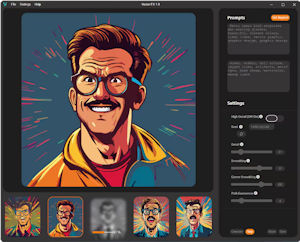
One of the key advantages of Vector FX is the ability to fine-tune the generated vector after creation. The software provides real-time controls for vector complexity, smoothing, corners, color simplification, shape simplification and path complexity.
You therefore do not necessarily have to accept the first result. Instead of simply creating another image with a new prompt, you can directly adjust the structure and level of detail of the generated vector.
The finished artwork can then be exported as an SVG file and further edited in CorelDRAW or another vector graphics application.
Who is Vector FX 2.0 for?
Vector FX 2.0 is particularly useful for anyone who regularly works with vector graphics. This includes graphic designers, illustrators, marketing teams, creative agencies and content producers.
The software can also be useful for print and sign shops. Corel specifically highlights applications such as vinyl cutting, laser engraving, CNC routing and plotting. In these workflows, a clean vector file is generally much more useful than a conventional AI-generated raster image.
The software can also be interesting for small businesses and freelancers. A logo, icon, illustration or custom design element can first be generated with AI and then adapted for a specific project or brand.
Vector FX 2.0 and CorelDRAW: A useful combination
Vector FX 2.0 does not replace CorelDRAW; it complements it. Vector FX is a standalone application designed specifically for AI-powered vector creation. The resulting SVG files can then be opened in CorelDRAW or another vector graphics application for further editing.
This creates a practical workflow: Let AI handle the initial creative concept, then take full control of the resulting vector artwork in your regular design application.
This can be particularly useful when you need to explore several ideas quickly, for example for a logo, T-shirt design, poster, sticker, packaging element or illustration.
What hardware does Vector FX 2.0 require?
Local AI processing also means that your computer needs to provide sufficient performance.
For the minimum configuration, Corel lists Windows 10 or Windows 11 in 64-bit, an 11th-generation or newer Intel Core processor or comparable AMD Ryzen processor, 16 GB of RAM and at least 15 GB of available storage. For faster results with GPU acceleration, Corel recommends 32 GB of RAM and a modern NVIDIA GeForce graphics card with 12 GB of VRAM.
Vector FX 2.0 supports Intel CPUs and GPUs, AMD CPUs and GPUs, as well as NVIDIA GPUs. Depending on the system, the software can operate using either the CPU or GPU.
This is an important point to consider before buying: Vector FX is designed as a local AI application, so performance will depend heavily on the hardware available in your PC.
Vector FX 2.0 is currently 50% off
Vector FX 2.0 is currently available with 50% off. For users who already work with CorelDRAW or are looking for a local solution for AI-generated vector graphics, this makes the offer worth a closer look.
The licensing model is particularly interesting. Vector FX 2.0 is offered as a perpetual license, rather than a subscription. Corel also states that there are no usage limits or credits required for generation.
For users who create AI graphics regularly, this can make a significant difference compared with services that charge for individual generations or operate entirely through monthly subscriptions.
My verdict: An interesting approach to AI vector graphics
Vector FX 2.0 takes a different approach from conventional AI image generators. The focus is not primarily on creating photorealistic images, but on generating scalable, editable vector graphics that can be integrated into professional design workflows.
The combination of local processing, multiple AI models, style presets, real-time vector controls and SVG export makes the software particularly interesting for users working with logos, illustrations, icons, print materials and marketing graphics.
For existing CorelDRAW users, the workflow is especially straightforward: Generate the artwork with Vector FX, export it as SVG and then continue editing it in CorelDRAW.
With 50% off, Vector FX 2.0 is currently worth considering if you want to experiment with AI-generated vector graphics while maintaining local processing and full control over the resulting artwork.
→ Check out Vector FX 2.0 at Corel and claim the 50% discount
Source: Corel Vector FX 2.0 product information. Corel confirms local processing, 18 AI model variants, SVG export, perpetual licensing and the listed hardware requirements.