A professional website needs more than good content. Its layout should also match the information being presented. Sometimes you need two columns for an introduction, three columns for your services, four product tiles, or a full-width section featuring a large image.
With the latest update, WebSite X5 2026.3, Incomedia makes this kind of page design easier. The popular website creation software introduces flexible sections that allow you to organize different layouts more independently within the same page and reuse existing design elements more efficiently.
This is an interesting development for anyone who wants to create a website without traditional coding while enjoying greater creative freedom. After all, making a website look more individual does not always require rebuilding everything from scratch. Sometimes, better tools that allow you to combine existing elements more flexibly are all you need.
What Is WebSite X5 2026.3?
WebSite X5 follows a different approach from subscription-based website builders. Instead of paying a mandatory monthly fee, you purchase a license and can continue using your version of the software for as long as you want, without ongoing license costs.
Incomedia regularly releases updates, with up to four updates per year introducing new features, fresh design options and improvements that address changing requirements. The latter can be particularly relevant if you use the built-in e-commerce features to operate an online shop.
Incomedia also offers an optional Update Guarantee that provides access to updates for a defined period. Twelve months are included with the purchase. After that, you can extend the Update Guarantee for another twelve months for an additional fee, if you wish.
The important point is that renewing the Update Guarantee is optional. You can continue using your existing WebSite X5 license without paying for further updates. You simply retain the features available in your licensed version rather than automatically receiving subsequent updates.
For users who prefer software without mandatory recurring subscription payments, this is an important distinction. You can decide whether continued access to new features is worth the additional cost for your particular project.
WebSite X5 2026.3: What’s New?
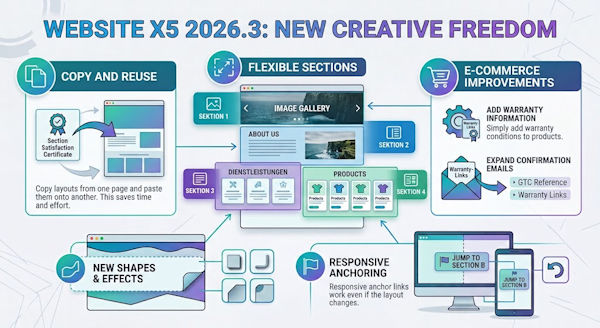
The main innovation in WebSite X5 2026.3 is the introduction of sections with independent layouts. The update also makes it easier to copy and reuse existing designs, adds new styling options for section shapes and borders, and improves anchor behavior and page editing.
Online shop owners also benefit from new options for managing warranty information and expanding order confirmation emails. The update therefore addresses both everyday web design tasks and specific e-commerce requirements.
- Flexible sections: Combine different column layouts on the same page.
- Reusable layouts: Move, cut, copy and paste sections and rows.
- New design options: Customize shapes, borders, rounded corners and shadows.
- Improved editing: Updated anchor behavior and undo functionality support a more convenient workflow.
- E-commerce features: Add warranty information and supplementary details to order confirmation emails.
Different Layouts on One Page Without Unnecessary Compromises
Anyone who designs websites soon discovers that different types of content do not necessarily benefit from the same layout. An introduction might work best in two columns. A list of services could look better with three columns, while a product overview might benefit from a four-column grid. There are plenty of other possibilities, depending on the content and the overall design.
Previously, the shared grid structure of a page had to accommodate these different requirements. This could mean compromising on individual sections or creating a more complicated layout than a particular area actually needed.
With the new sections in WebSite X5 2026.3, each area of a page can be organized more independently. For example, you can create a two-column introduction, display three services underneath it and then present four products in a separate grid. Each section has its own structure, so the column arrangement of one area no longer determines the layout of the next.
The familiar working method based on rows, columns and objects remains unchanged. You do not have to learn an entirely new approach to building pages. Instead, you gain more freedom to decide how individual elements should be arranged.
Sounds good? It is. On larger websites in particular, this flexibility can make a noticeable difference. The more varied the content, the more important it becomes to present each section appropriately rather than forcing the entire page into a uniform structure.
Copy and Reuse Sections to Avoid Repetitive Work
Creating an attractive layout takes time. It is frustrating when you later have to rebuild the same design on another page, even though you have already done the work once.
WebSite X5 2026.3 makes it easier to work with existing sections. You can move them, cut, copy and paste them, either within the same page or onto another page. Entire rows can also be copied and pasted.
The practical advantage is straightforward. Suppose you have created an attractive customer testimonial section, a services overview or a product presentation. You can reuse that design elsewhere instead of recreating every element individually.
The arrangement and settings of the objects within a section are retained when the section is transferred. This makes it easier to maintain a consistent appearance across multiple pages.
This is particularly useful for websites that are regularly expanded. If you add new services, introduce more products or create additional landing pages, you can make better use of existing design elements. The time saved can then be invested in improving your content, images and user experience.
Better Control Over Responsive Design and Anchors
Modern web design has to work on more than a desktop monitor. Content should also remain readable and well organized on tablets and, especially, smartphones. Depending on the screen size, you may need to rearrange elements or hide certain objects in specific responsive layouts.
The new sections provide a clearer way to organize page layouts and manage the associated styles and responsive settings.
Incomedia has also revised the behavior of anchors. Links should continue to work correctly even when an object is hidden in a particular responsive view.
This is especially relevant to longer pages with tables of contents, jump links or navigation elements that take visitors directly to specific sections. These details are easy to overlook during website creation, but they can affect usability when links no longer behave as expected.
The undo functionality is another useful improvement to the editing workflow. If a change does not produce the desired result, you can reverse it. This makes it easier to experiment with different layouts and refine your design step by step.
New Shapes for More Individual Website Designs
The more flexible sections in WebSite X5 2026.3 also expand the available design options. One of the new features is Shape, which allows you to modify the bottom edge of a section.
Instead of always ending a section with a straight horizontal line, you can choose from several predefined shapes and adjust their height and alignment. The shape works like a mask and can be used independently of the section’s background.
This makes it possible to create smoother transitions between sections, visually separate an image area from the content below it, or give selected parts of a page more prominence. Background options still include solid colors, gradients and images.
You can also customize section borders, including their color, thickness, rounded corners and shadows.
These options are useful if you want your website to look less like a standard template. Carefully chosen shapes and subtle shadows can give a design a more distinctive appearance. The key is not to overdo the effects but to use colors, spacing and shapes that complement the content.
Another advantage is that these adjustments can be made directly in WebSite X5. Based on the features described in the update announcement, you do not need an external solution to take advantage of these design options.
WebSite X5 2026.3 Also Introduces Improvements for Online Shops
In addition to its web design features, the update addresses the management of warranty information in online shops. This is where software updates can also become relevant to legal requirements, particularly when a shop needs to display additional product information.
Incomedia refers to new European requirements concerning statutory consumer guarantees and commercial durability guarantees. For online retailers, it is important to distinguish between statutory consumer rights and an additional commercial guarantee offered by a manufacturer or seller. These are different legal concepts and should not be confused.
WebSite X5 2026.3 introduces options for storing product warranty details and adding information to order confirmation emails. This can include links and relevant documents.
These features can help shop owners provide customers with important information during the ordering process and in subsequent communications. However, the information required in a particular case depends on the product, the type of guarantee and the applicable legal requirements. The new features do not replace the need to check the obligations that apply to your own online shop.
Important: Being able to add warranty information to an online shop does not automatically mean that the shop complies with every applicable legal requirement. Shop owners should verify the relevant rules and keep their product information up to date. WebSite X5 provides useful technical tools to help implement the required information, where applicable.
Who Can Benefit from WebSite X5 2026.3?
The new features are particularly interesting for users who build and maintain their own websites and want greater control over their layouts. This applies to WebSite X5 in general, but the latest update offers additional benefits for several types of users.
Freelancers and small businesses can create more individual service pages, customer testimonial sections and contact areas. Reusing existing layouts also makes it easier to maintain a consistent design across multiple pages.
Freelancers, agencies and web designers can benefit from reusable layouts when working with recurring design elements. A section created once can serve as the basis for additional pages without requiring every object to be rearranged manually.
Product websites and corporate websites gain more flexibility when presenting different types of content in appropriate column layouts. This is useful for product overviews, service descriptions and editorial content.
Online shop owners should also explore the new options for managing warranty details and adding relevant information to order confirmation emails.
If you only create very simple websites with a uniform layout, you may initially notice fewer benefits from the new sections. Their value increases with the complexity and variety of your content. However, once you start expanding a website built with WebSite X5, you may discover that this additional flexibility becomes increasingly useful.
WebSite X5 Stays True to Its Original Approach
One of the interesting aspects of WebSite X5 2026.3 is that Incomedia has not completely changed the way users work with the software. The new features build on the familiar principle of assembling websites from rows, columns and objects.
This is a sensible approach. A new feature is particularly valuable when it simplifies everyday work without forcing users to learn an entirely different interface or workflow.
The new sections are designed to achieve exactly that: greater freedom in page design, easier reuse of existing layouts and additional options for creating distinctive websites. Combined with improvements to responsive settings, anchors and online shop management, the update addresses several practical aspects of website creation.
My Verdict: A Useful Update for Greater Design Freedom
WebSite X5 2026.3 addresses a problem that becomes increasingly apparent when building larger websites: different types of content need different layouts. The new sections allow these areas to be designed more independently without abandoning the software’s familiar working method.
What I particularly like is that the update is not just about adding more design options. It is also intended to make everyday work more efficient. Sections and rows can be reused, layouts no longer have to be rebuilt from scratch, and the additional options for shapes and borders provide more room for individual design choices.
The improvements for online shops round out the update. For anyone who wants to create and expand a website independently, while avoiding unnecessary additional tools, WebSite X5 2026.3 is an interesting development.
How much you benefit from this update depends on your particular projects. If your website contains different content sections, multiple pages or custom layouts, the new features are likely to be especially useful.
Want to learn more about WebSite X5? Visit the official overview page to explore the software, its features and the available editions.
Discover WebSite X5 and explore the available versions
WebSite X5: Save 30% Now
Create your own website with WebSite X5 and get 30% off the version of your choice.
WebSite X5 Evo
An easy way to get started with creating your own website..
WebSite X5 Pro
For larger website projects and more advanced design options.
The discount offer is subject to the provider’s terms and conditions