Building a professional website should not have to mean hiring an expensive agency, learning to code, or committing to another monthly subscription. If you are a freelancer, run a small business, or have a business idea you want to bring to life, there is another option worth considering: WebSite X5.
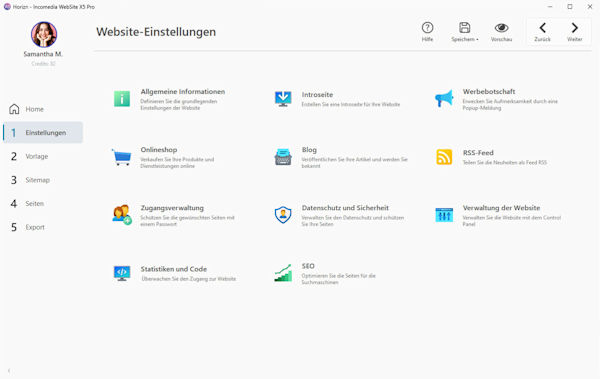
WebSite X5 is desktop website-building software for Windows that lets you create and publish your own website using a visual interface. You can start with a template, organize your pages, add your own content, and build a website that reflects your business. You do not need to be a developer to get started.
Depending on the edition you choose, you can create anything from a straightforward business website to a more extensive online presence with e-commerce features.
Explore the current WebSite X5 Offer
Why Create Your Website Yourself?
A website is often one of the first places potential customers go to learn about a business. It needs to explain what you offer, establish trust, and make it easy for people to contact you.
But the way you build that website matters, too. An agency can deliver a polished result, but professional design and ongoing support may become expensive. WordPress offers extensive flexibility, yet it also requires you to manage updates and maintain your installation. Online website builders can be convenient, but many use recurring subscription plans.
WebSite X5 offers a different approach: you work with software installed on your Windows PC and create your website through a visual editor.
This can be especially appealing if you want more control over your website and prefer to manage your own content rather than depend on a third party for every small change.
Three Ways WebSite X5 Can Help You Build Your Business
1. A Professional Website for Freelancers and Service Providers
If you work as a consultant, designer, tradesperson, coach, or independent professional, your website can serve as your digital business card.
You could create a homepage explaining what you do, dedicated pages for your services, an introduction to your background, customer testimonials, and a contact page.
The advantage is control. When your services change, you can update your own website without having to request every revision from a designer or agency.
2. A Website for a Small Business
Small businesses often need a clear online presence without the complexity of a large web project.
A well-organized website can explain your products or services, introduce your company, answer common questions, and help potential customers find your contact details. Local businesses can also use their website to communicate opening hours, service areas, and other practical information.
With WebSite X5, you can build and maintain that presence yourself. The result depends on your content, design choices, and how carefully you structure the site, but you do not need to write code to begin.
3. A Website for a New Business Idea
Perhaps you want to test a new service, launch a side business, or explore a business idea before investing heavily in it.
A website can help you explain the idea, present an initial offer, and give interested people a way to get in touch. You can begin with a manageable number of pages and expand as your project develops.
That makes a do-it-yourself website an interesting option for people who want to keep their initial costs and commitments under control.
Imagine the Website You Could Build
Think about a simple but professional website for a freelance business or small company.
Your homepage introduces your business and explains the main benefit you offer. Three service pages describe what customers can book or buy. An About page tells visitors who you are and why they can trust you. A references or testimonials page provides social proof, while a contact page makes it easy to take the next step.
That is already a useful foundation for many small businesses.
You can add more pages when necessary, improve the content over time, and develop the site alongside your business. You do not need to build everything on day one.
The most important question is not whether your website has dozens of features. It is whether visitors can quickly understand what you offer and how to work with you.
AI Features Can Help You Get Started
Starting with a blank page can be difficult, particularly if writing website copy is not your main skill.
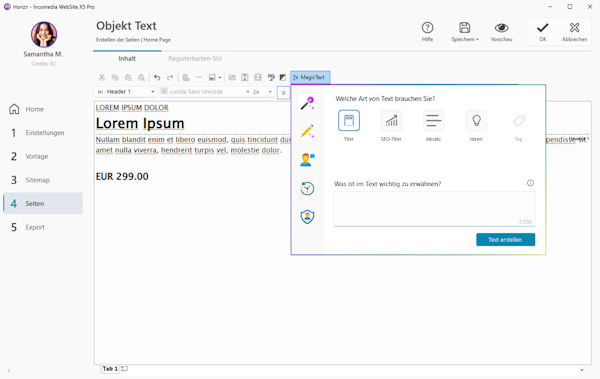
WebSite X5 includes AI-assisted features such as MagicSite and MagicText. These can help you develop a website structure and generate initial text drafts, giving you a starting point for your project.
AI-generated content should still be reviewed and adapted. Your website needs to reflect your actual services, experience, prices, and promises. Treat AI as an assistant that helps you get moving, not as a substitute for your knowledge of your business.
For a small business owner working alone, that assistance can make the initial setup feel more manageable.
WebSite X5 vs. WordPress: Which Approach Makes More Sense?
WordPress is a powerful content management system with a large ecosystem of themes, plugins, and integrations. It is an excellent choice for many websites, particularly projects that need extensive customization or a publishing workflow built around frequent articles.
However, flexibility comes with responsibility. A typical WordPress installation needs regular attention to core software, themes, and plugins. Updates are important for security and compatibility, and occasionally an update can create conflicts that need to be resolved.
WebSite X5 takes a different approach. You build your website in desktop software and publish the result to your hosting account. For a typical website that does not rely on a server-side content management system and a collection of plugins, this can mean fewer website components to maintain.
That does not make a WebSite X5 website maintenance-free or automatically secure. You still need to protect your computer and account credentials, keep your software up to date, maintain backups, and choose suitable hosting. WordPress can also be secure when properly maintained.
The real difference is the workflow. If you enjoy the flexibility of WordPress and are comfortable managing it, WordPress may be the better fit. If you prefer to create your website in a visual desktop application and want to avoid managing a conventional WordPress installation, WebSite X5 is worth a closer look.
What About Online Website Builders?
Hosted website builders can be convenient because the software and hosting are often managed through one service. Depending on the provider and plan, you may also get templates, support, and integrated business features.
The trade-off is that many services charge recurring fees. Over several years, those payments can add up, particularly if you need additional features or a higher-tier plan.
WebSite X5 uses a different model based on desktop software. This can be attractive if you prefer to purchase software rather than pay an ongoing website-builder subscription.
However, compare the complete cost before deciding. You will generally still need a domain and web hosting, and optional updates, add-ons, or edition-specific features may affect the total. Check the current license terms and the exact functions included in the version you plan to buy.
Can You Build an Online Shop with WebSite X5?
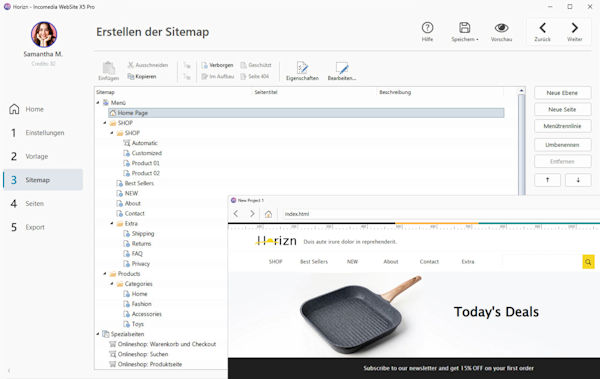
Yes, WebSite X5 offers e-commerce functionality, with available features depending on the edition. The Pro edition is the one to examine if you want to build a more extensive online shop.
For a business selling products or services online, the ability to create the website and shop within the same software may be appealing. Depending on your requirements, it may also be an alternative to hosted shop platforms that charge recurring fees.
But do not compare prices alone. Before choosing a solution, check the payment methods, shipping options, tax requirements, product management, legal requirements, and any additional services your shop needs. Payment providers and other third-party services may charge their own fees, even when your website software does not require a monthly subscription.
For a small shop with the right requirements, WebSite X5 could be an economically interesting option. For a complex store with specialized integrations or demanding workflows, compare the available functions carefully before committing.
Which WebSite X5 Edition Should You Choose?
The right edition depends on the website you want to build. WebSite X5 Go can be a useful starting point for a basic website, while Evo and Pro offer additional capabilities for more demanding projects. If you are building a business website or planning to sell online, review the current feature comparison before making your choice.
You can find a detailed breakdown here: (coming soon)
Do not pay for features you will never use, but do consider where your business might be in a year or two. Choosing an edition that fits your realistic plans can help you avoid unnecessary limitations later.
Is WebSite X5 Right for You?
WebSite X5 is worth considering if you want to create your own website, prefer a visual editing process, and want more direct control over changes and content.
It may be a particularly good fit if you are:
- A freelancer or self-employed professional who needs a clear business website.
- A small company that wants to manage its own online presence.
- An entrepreneur testing a new business idea.
- A Windows user who prefers desktop software to a hosted website builder. Someone who wants to compare the long-term cost of software ownership with recurring subscription plans.
It may be less suitable if you need a highly customized web application, depend on a specific WordPress plugin, or require complex integrations that the software does not support.
The best website platform is not necessarily the one with the most features. It is the one that fits your project, budget, and willingness to manage the website yourself.
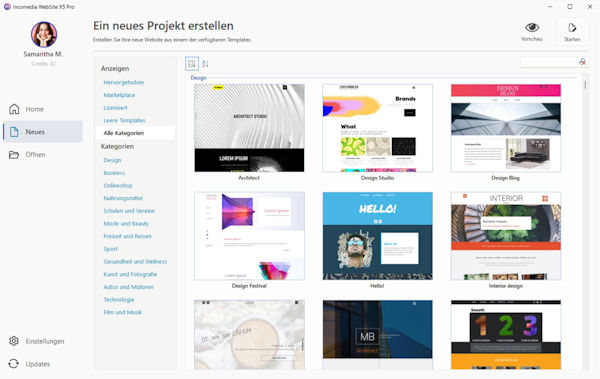
Take the Next Step: Compare WebSite X5 Evo and Pro
If WebSite X5 sounds like a good fit, take a look at the editions before deciding. At the time of writing, Evo and Pro are being offered with a 35% discount through the links below. The discount is integrated into the respective links; check the current offer and conditions before purchasing.
Evo may be sufficient for many conventional websites, while Pro is worth considering if you need more advanced features, particularly for e-commerce. Use the comparison guide above to check which edition matches your plans.
Your website should work for your business—not become another expensive project you cannot manage yourself. If you want a practical way to build and maintain your own online presence, WebSite X5 deserves a place on your shortlist.