 Do you want to create a logo, design an illustration, prepare artwork for a cutting plotter, or turn a simple idea into a professional vector graphic? Then Vector FX 2.0 could be worth a closer look. The AI-powered application converts text prompts or images into scalable, fully editable vector graphics.
What Is Vector FX 2.0?
Vector FX 2.0 is an AI-powered application for creating vector graphics. You can describe what you want to create using a text prompt, and Vector FX generates a vector graphic based on your description.
For example, a prompt such as “minimalist mountain logo with a sun, clean lines, limited colors” can be used as the starting point for a logo concept. You can also create illustrations, icons, clipart, patterns, and other graphic elements.
The result can then be further edited and exported as an SVG file. What makes this particularly interesting is the combination of generative AI and traditional vector workflows. The generated artwork is not simply intended for viewing. It can be adjusted, scaled, and prepared for different applications.
What Can I Do with Vector FX?
The practical benefit of Vector FX is that it can help you move quickly from an idea to a usable vector graphic. Instead of creating every graphic manually or spending a long time searching for suitable vector assets, you can first describe what you need.
This opens up a wide range of possible applications:
- Logos and branding concepts: Create initial logo ideas, symbols, and graphic elements for businesses, projects, or organizations.
- Icons and symbols: Generate custom icons for websites, apps, presentations, or documentation.
- Illustrations: Create vector-based illustrations for websites, print projects, books, or social media.
- Clipart: Generate custom motifs instead of relying exclusively on traditional clipart collections.
- Patterns and decorative elements: Create graphic patterns and reusable design elements for packaging, print projects, or websites.
- Plotter and cutting designs: Prepare vector artwork for cutting plotters, vinyl cutters, and similar applications.
- Laser engraving and CNC: Use vector graphics as a starting point for engraving, milling, and other technical applications.
- Marketing materials: Develop graphic elements for flyers, advertisements, social media posts, and other marketing content.
This can be particularly useful for small businesses, freelancers, designers, and creative users. Not every small graphic requires a complete design project. Vector FX can provide an initial concept that you can then customize and develop further.
The Major Advantage: The Result Remains a Vector
This is where Vector FX differs from many conventional AI image generators.
A typical AI-generated image consists of pixels. If you enlarge it significantly or want to use it for professional printing, you may eventually encounter quality limitations. Vector graphics work differently. They are based on paths, shapes, and curves and can therefore be scaled without the typical loss of quality associated with raster images.
Vector FX creates fully editable SVG vector graphics. This means you can continue working with the results in vector graphics software. CorelDRAW is an obvious choice, but SVG is a widely supported format that can also be used with other suitable design applications.
This makes Vector FX more than just an idea-generation tool. It can become part of an actual design and production workflow.
Vector FX Runs Locally on Your PC
Another important aspect is how the application works. Vector FX processes generation locally on your device. You do not need to send your graphics to an external cloud service for AI processing.
This can be particularly relevant for businesses and professional users who do not want to upload internal concepts, customer materials, or other potentially sensitive design assets to an external online service.
Local processing also has a financial advantage: Vector FX does not use a subscription or credit-based model. You purchase the software once and can then use it without having to manage a recurring generation allowance.
18 AI Models in Vector FX 2.0
Vector FX 2.0 is not limited to a single AI model. Its integrated Model Hub provides access to 18 optimized model variants. These include Flux.1 Schnell, Stable Diffusion 3.5 Medium, Segmind Stable Diffusion 1B, and SDXL Turbo.
This is useful because different models can offer different strengths depending on your hardware, desired processing speed, and preferred visual style. You can experiment with different models and determine which one works best for your particular projects.
Style Presets Make Getting Started Easier
Not everyone wants to spend time learning advanced prompt engineering. This is where Vector FX’s AI Style Presets can help.
You can select styles such as logos, icons, clipart, patterns, or vector illustrations. This means you do not have to describe every visual characteristic in a long and complicated prompt.
That makes Vector FX accessible to users who know what they want to create but do not necessarily have extensive experience writing detailed AI prompts.
Fine-Tune Your Vectors After Generation
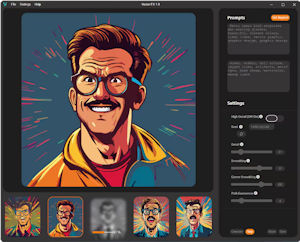
Another important feature is the level of control over the generated result. Vector FX provides several settings that allow you to influence the structure of the resulting vector artwork.
These include detail level, smoothing, corners, color simplification, shape simplification, and path complexity. The results can be adjusted in real time without having to regenerate the entire graphic every time.
This is particularly useful when the AI creates the right overall motif but the resulting vector contains too many details or unnecessarily complex paths.
For a cutting plotter or laser engraving project, for example, a clear and simplified structure may be preferable. An illustration, on the other hand, may benefit from a considerably higher level of detail.
From an Idea to a Finished Design
The Vector FX workflow is straightforward:
Idea → Prompt or image → AI generation → Select a style → Fine-tune the vector → Export SVG → Continue editing.
You do not have to start with a text prompt. An existing image, sketch, or concept can also serve as the starting point. You can then refine the result using the vector controls and export it as an SVG file.
The interesting part is not simply the speed of AI generation. It is the ability to turn an idea into an editable part of a real design workflow with relatively little effort.
Particularly Interesting for CorelDRAW Users
If you already work with CorelDRAW, Vector FX fits naturally into your workflow. Vector FX is a standalone application and can export the generated SVG artwork to CorelDRAW, where you can continue editing it in detail.
This creates a useful division of tasks: Vector FX handles the AI-assisted creation of an initial concept, while CorelDRAW can be used for professional refinement, layout, typography, and final output.
You therefore do not necessarily have to change your existing workflow. Vector FX can simply become an additional tool within your current vector design process.
Who Can Benefit from Vector FX?
Vector FX is not aimed exclusively at professional graphic designers. The application can be useful anywhere individual vector graphics are needed on a regular basis.
For graphic designers, Vector FX can speed up ideation and the creation of initial artwork. Marketing teams and agencies can use it to quickly develop different graphic concepts for campaigns.
For print shops, sign makers, and advertising businesses, the vector output is particularly interesting. Designs can be further adapted for plotters, cutting applications, signage, and other production processes.
Freelancers and small businesses can also benefit. Not every graphic requires hiring a professional designer. For simple icons, illustrations, or initial design concepts, AI can provide a useful starting point that can then be customized.
And of course, Vector FX can also appeal to creative hobbyists who want to create their own vector graphics without first having to master the manual construction of paths and shapes.
No Recurring Credits: Buy Once and Use It
One aspect of Vector FX that I find particularly interesting is its licensing model. The software is offered as a perpetual license. There is no monthly subscription and, according to the manufacturer, no credit system limiting the number of generations.
This changes the economics compared with many web-based AI services. If you use Vector FX regularly, you do not have to keep track of how many generations remain in your current allowance.
That can be particularly useful for a tool designed for experimentation. You can try different prompts, models, and styles without having to plan around an additional generation budget.
What Hardware Does Vector FX Require?
Vector FX 2.0 runs on Windows 10 and Windows 11 in 64-bit versions. Corel lists 16 GB of RAM and a modern Intel Core or AMD Ryzen processor among the minimum requirements. For faster results with GPU acceleration, 32 GB of RAM and a modern NVIDIA graphics card with 12 GB of VRAM or suitable Intel hardware are recommended.
This is an important consideration: because the AI processing takes place locally, your hardware has a much greater impact on performance than it would with a purely cloud-based service. A more powerful PC can therefore make the workflow considerably faster.
Vector FX 2.0: What Is the Real Benefit?
The real benefit of Vector FX, in my view, is not simply that the software can “generate images with AI.” There are already many tools that can do that.
What makes Vector FX more interesting is the combination of AI generation, genuine vector output, local processing, extensive customization options, and a perpetual license.
You can start with a relatively rough idea and gradually turn it into a useful vector graphic. This can save considerable time when you regularly need custom graphic elements but do not want to construct every graphic manually from scratch.
And because the result is a vector, the workflow does not end with AI generation. You can continue the actual design work in CorelDRAW or another suitable vector graphics application.
Vector FX 2.0 Currently 50% Off
Vector FX is also interesting from a pricing perspective right now. The regular price is listed at €142.99. The current offer reduces the price to €70.99 including VAT, which represents a 50% discount. A 30-day money-back guarantee is also available.
For a perpetual-license application, this can be an attractive opportunity if you already have specific use cases for AI-generated vector graphics. Instead of adding another monthly AI subscription to your toolkit, you get a locally installed application that can be used without recurring credits.
Learn more about Vector FX 2.0 at CorelDRAW
My Verdict on Vector FX 2.0
Vector FX 2.0 is particularly interesting if you do not simply want to generate AI images, but actually need editable vector graphics for real projects.
The application combines text-to-vector generation with tools for directly optimizing the generated paths. It also provides 18 AI model variants, style presets, SVG export, local processing, and a licensing model without subscriptions or recurring credits.
This makes Vector FX less of a toy for occasional AI experiments and more of a tool that can become part of an existing design workflow.
I find the approach particularly compelling for users who regularly need logos, icons, illustrations, clipart, plotter designs, or other vector graphics. The AI does not necessarily have to take over the entire design process. Instead, it can handle one of the most time-consuming steps at the beginning: turning an idea into a useful vector concept quickly.
That, in my opinion, is where Vector FX really shows its strength.