A Windows PC needs more than occasional operating system updates. The drivers responsible for communicating with your hardware and the applications installed on your computer should also be checked regularly. At the same time, many PCs gradually accumulate programs that are no longer needed.
With Driver Booster 14 PRO and IObit Uninstaller 16 PRO, IObit offers two specialized Windows utilities designed to handle these tasks. One helps you find and install updated drivers, while the other makes it easier to remove unwanted software more thoroughly.
Both programs are also included in the current IObit Black Friday Bundle. This makes them particularly interesting if you are looking for several tools to help maintain your Windows PC.
Driver Booster 14 PRO: Keep Your Drivers Up to Date More Easily

Drivers are essential for Windows to communicate properly with your computer’s hardware. Whether you are using a graphics card, sound chip, network adapter, printer, or other connected devices, the correct drivers are necessary for everything to work as intended.
Windows automatically installs many drivers and also provides updates through Windows Update. However, there are situations where a newer driver is available directly from the hardware manufacturer or where a specific hardware issue can be resolved by installing an updated version.
Finding these drivers manually can be time-consuming. First, you need to identify your hardware, then locate the appropriate manufacturer’s website and finally select the correct driver.
This is exactly where Driver Booster 14 PRO comes in.
How Does Driver Booster Work?
After scanning your system, Driver Booster displays detected drivers for which updates are available. You can then decide which updates you want to install.
The software uses an extensive driver database. According to IObit, version 14 includes a database containing more than 23 million drivers. The software supports driver searches for a wide range of Windows hardware components.
Key features include:
- Automatic driver scanning: Checks your system for outdated or missing drivers.
- Driver updates: Simplifies the installation of available driver updates.
- Extensive driver database: Provides access to a large selection of device drivers.
- Automatic checks: Supports regular driver scans.
- Additional repair tools: Helps troubleshoot certain audio, network, and other device-related problems.
Why Are Updated Drivers Important?
Driver updates can fix bugs, improve compatibility, and introduce new features for certain devices. Graphics card drivers, for example, may include optimizations for newer games and applications.
However, a newer driver is not automatically better for every user. If your PC is running reliably and all your devices work as expected, there may be no reason to replace every driver.
Before installing major driver updates, it is advisable to create a Windows restore point. For particularly important hardware components, you should also consider using drivers directly from the manufacturer’s website and install updates selectively.
Driver Booster PRO vs. the Free Version
Driver Booster is also available as a free version. It already provides basic functionality for scanning your system for outdated drivers. The PRO version expands the feature set and offers additional options for updating and managing drivers.
If you maintain several Windows PCs or regularly work with different hardware configurations, the more comprehensive management features can be useful.
IObit Uninstaller 16 PRO: Remove Programs More Thoroughly
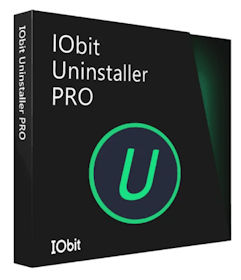
The second useful tool is IObit Uninstaller 16 PRO. Almost every Windows user has encountered this situation: You uninstall a program, but some files, folders, or other leftovers remain on your computer.
Windows normally handles software removal reliably. However, additional files, configuration data, or registry entries may sometimes remain behind. This is not necessarily a problem, but over time it can lead to unnecessary data leftovers and a less organized software installation.
This is where IObit Uninstaller comes in.
What Can IObit Uninstaller Do?
The software helps you uninstall installed applications and can subsequently scan for leftover files and entries. This makes it possible to identify additional files and components that may not have been removed automatically during a standard uninstallation.
Important features include:
- Software uninstallation: Easily remove installed applications.
- Leftover scanning: Detect additional files, folders, and registry entries.
- Batch uninstallation: Manage and remove multiple applications more efficiently.
- Difficult-to-remove programs: Provides assistance with certain applications that are harder to uninstall.
- Browser extensions: Manage and remove extensions you no longer need.
Why Is More Thorough Uninstallation Useful?
If you regularly try new software, install applications, and remove them later, various program leftovers can accumulate over time. This particularly applies to applications that create their own data folders, configuration files, or additional components.
An uninstaller with an additional leftover scan can help identify these remnants. However, you should always review the detected entries before deleting them permanently. Not every file or registry entry associated with an application is automatically unnecessary.
Extra caution is particularly important when dealing with shared components or software that may still be required by other applications.
Driver Booster and IObit Uninstaller Work Well Together
Both programs serve different purposes, but they complement each other as part of a regular Windows PC maintenance routine.
Driver Booster focuses on the drivers required by your hardware. IObit Uninstaller, on the other hand, helps remove applications you no longer need and identify remaining program files.
Combined with regular Windows maintenance, these tools provide a practical software package for users who prefer to maintain their own computers.
| Program | Main purpose | Particularly useful for |
|---|---|---|
| Driver Booster 14 PRO | Find and update drivers | Users with different hardware configurations and driver requirements |
| IObit Uninstaller 16 PRO | Remove programs and detect leftovers | Users who frequently install and uninstall software |
IObit Black Friday 2026: Both Programs Included in a Larger Software Bundle
An especially interesting option right now is getting both programs together with four additional PRO applications in the IObit Black Friday Bundle.
The package includes six applications:
- Advanced SystemCare 20 PRO: Clean and optimize your Windows PC.
- Driver Booster 14 PRO: Find and update device drivers.
- IObit Uninstaller 16 PRO: Remove applications more thoroughly.
- Smart Defrag 12 PRO: Optimize traditional hard disk drives.
- IObit Software Updater 9 PRO: Update installed applications.
- IObit Malware Fighter 14 PRO: Additional security features against malware.
The complete bundle currently costs just US$29,49 instead of the regular US$389,99 or similar in other countries and currencies. That represents a 90% discount.
All six PRO applications include a one-year license for up to three PCs each. If you maintain several Windows computers or already plan to use multiple tools from the package, this is a comprehensive software offer worth considering.
The IObit Black Friday Bundle
6 PRO applications for just $29,49 instead of $389.63
Driver Booster, IObit Uninstaller, Advanced SystemCare, and three additional PRO applications in one package.
GET THE 90% BLACK FRIDAY DISCOUNT NOW
One-year licenses for up to three PCs per application. Please refer to the provider’s terms and license conditions.
My Conclusion: Two Useful Tools for Regular PC Maintenance
Driver Booster 14 PRO and IObit Uninstaller 16 PRO address two different aspects of Windows maintenance. Driver Booster makes it easier to find updated drivers, while IObit Uninstaller helps remove unwanted software and detect remaining program files.
Neither program is essential for keeping a Windows PC running properly. Many maintenance tasks can also be handled using Windows’ built-in tools. However, if you regularly install software, maintain different devices, or simply want to avoid searching for drivers manually, the additional features can be useful.
The current IObit Black Friday Bundle makes the combination particularly attractive. For €30.99, you get not only Driver Booster and IObit Uninstaller but also four additional PRO applications, each with a one-year license for up to three PCs.
If you plan to use several of these tools, this offer is definitely worth a closer look.
“`