
Team MindMap with MindManager
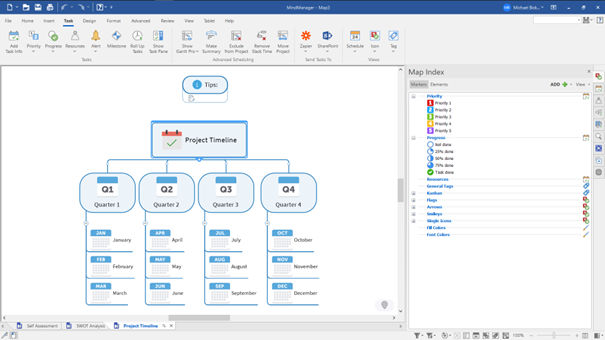 In today’s working world, it is no longer just the quality of an idea that determines success, but above all the ability to implement that idea in a structured and efficient way. This is exactly where MindManager comes in.
Whether you are a freelancer juggling multiple projects, working in a team, or coordinating complex processes: without clear structure, time, focus, and ultimately results are quickly lost. MindManager offers you a visual approach that solves exactly this problem – much more consistently than traditional to-do lists or simple project tools.
Why Visual Project Management Is Crucial Today
Many tools focus on linear task lists. The problem: projects are rarely linear. Dependencies, priorities, and parallel processes are difficult to capture in traditional lists.
MindManager takes a different approach. Instead of displaying information in isolation, relationships are made visible. This has several concrete advantages:
- You immediately recognize dependencies between tasks
- Priorities can be set intuitively
- Complex projects are broken down into understandable parts
- Decisions can be made faster
Especially for larger projects, this creates a real productivity lever. You don’t just work more—you work more effectively.
Features in Detail: More Than Just Mind Maps
Many people originally know MindManager as a mind mapping tool. However, in the current version, its functionality goes far beyond that.
Dynamic Mind Maps for Planning and Structure
The starting point is usually classic mind maps. Ideas can be captured, structured, and expanded quickly. One of the strongest aspects is flexibility: content can be rearranged at any time without losing clarity.
This makes MindManager ideal for:
- Brainstorming
- Project planning
- Content strategies
- Business models
Flowcharts for Processes and Workflows
As things become more concrete, flowcharts come into play. They allow you to visualize processes, decision paths, and workflows.
This is extremely helpful in a business context, for example for:
- Automated workflows
- Customer processes
- Internal procedures
You can immediately identify bottlenecks or optimization potential.
Gantt Charts for Time Planning and Control
A real highlight is the integrated Gantt charts. They allow you to turn your planning directly into a timeline with clear dependencies.
Specifically, this means:
- Tasks are placed within a timeline
- Dependencies are automatically considered
- Delays can be identified early
Especially when deadlines are critical, this gives you a massive advantage.
Integration into Existing Work Environments
A tool is only truly efficient if it integrates seamlessly into existing systems. This is where MindManager performs particularly well.
Integration with Microsoft Teams, Microsoft SharePoint, and Jira ensures that you are not building isolated solutions, but instead meaningfully extending your existing infrastructure.
This provides clear benefits:
- Tasks and information remain synchronized
- Teams work on a shared data foundation
- Media disruptions are reduced
Especially in teams using multiple tools, this is a decisive factor for efficiency.
Transparency as a Productivity Booster
A frequently underestimated aspect of project management is transparency. When it is always clear what has been completed and what is still pending, friction losses are significantly reduced.
A quote sums it up well:
“A project can be carried out much more efficiently when you can always see what has already been completed and what still needs to be done.”
This visual clarity is one of the biggest advantages of MindManager. You no longer need to search or interpret—you see it directly.
Editions Overview – Which One Fits You?
MindManager Essentials
The web version is ideal for individual users who want to work flexibly and independently of location. It covers the most important functions and is perfect for:
- Freelancers
- Beginners
- Simple project structures
MindManager Professional
The Professional version is the full package for ambitious users and small teams.
Here you get:
- The complete feature set
- Desktop and web usage
- Advanced diagram types
- Comprehensive integrations
If you are serious about planning or scaling projects, this is the most practical choice.
MindManager Enterprise
For larger companies, the Enterprise version offers additional features such as:
- Centralized management
- Advanced security features
- Scalability for teams and departments
This turns MindManager into a true collaboration platform.
25% Discount: Is Now the Right Time to Start?
There is currently a limited-time offer: 25% discount on the annual plan in the first year.
From a strategic perspective, this is a good entry point. Why?
- You reduce your risk when testing
- You can evaluate the tool directly in real workflows
- Costs remain manageable
Especially if you are already looking for better structure in your projects, this is a favorable moment.
Free Trial: Start Without Risk
In addition, a 30-day fully functional trial version is available. This is crucial because tools like MindManager reveal their true value only in practical use.
My pragmatic advice:
Don’t test it “on the side”—use a real project. Only then will you understand how much the visual approach actually changes your workflow.
Conclusion: Who MindManager Is Really For
MindManager is not a tool for simple task lists. It would be overkill for that.
Its strength clearly lies in structuring complex content and projects. If you:
- Manage multiple projects simultaneously
- Think in dependencies and processes
- Need more clarity and overview
…then MindManager is one of the most efficient tools in this field.
The greatest added value does not come from individual features, but from the combination of visualization, structure, and integration.
Get Started Now and Save 25%
If you want to manage your projects in a more structured, transparent, and efficient way, it’s worth taking a closer look.
Secure 25% discount now and test MindManager free for 30 days.




